

Do you want to disable/turn off or get rid of the Meta AI button on WhatsApp?
Well, there is a way to remove Meta AI chat.
You need to download the older version of the app, as there is no AI feature available in the older version.
So, follow the steps mentioned in this guide on how to remove/disable/ turn off Meta AI from WhatsApp on Android.
Now, let’s begin with the steps.
Steps To Remove Meta AI on WhatsApp
Step 1: First of all, uninstall the app from your phone.
Step 2: Then go to: https://whatsapp-messenger.en.uptodown.com/android.
Step 3: Click on “Older versions”, scroll down, and click on “See More”.
Step 4: Find and select a WhatsApp whose version is older than September 20, 2023.
(for example: Sept 18, 2023)
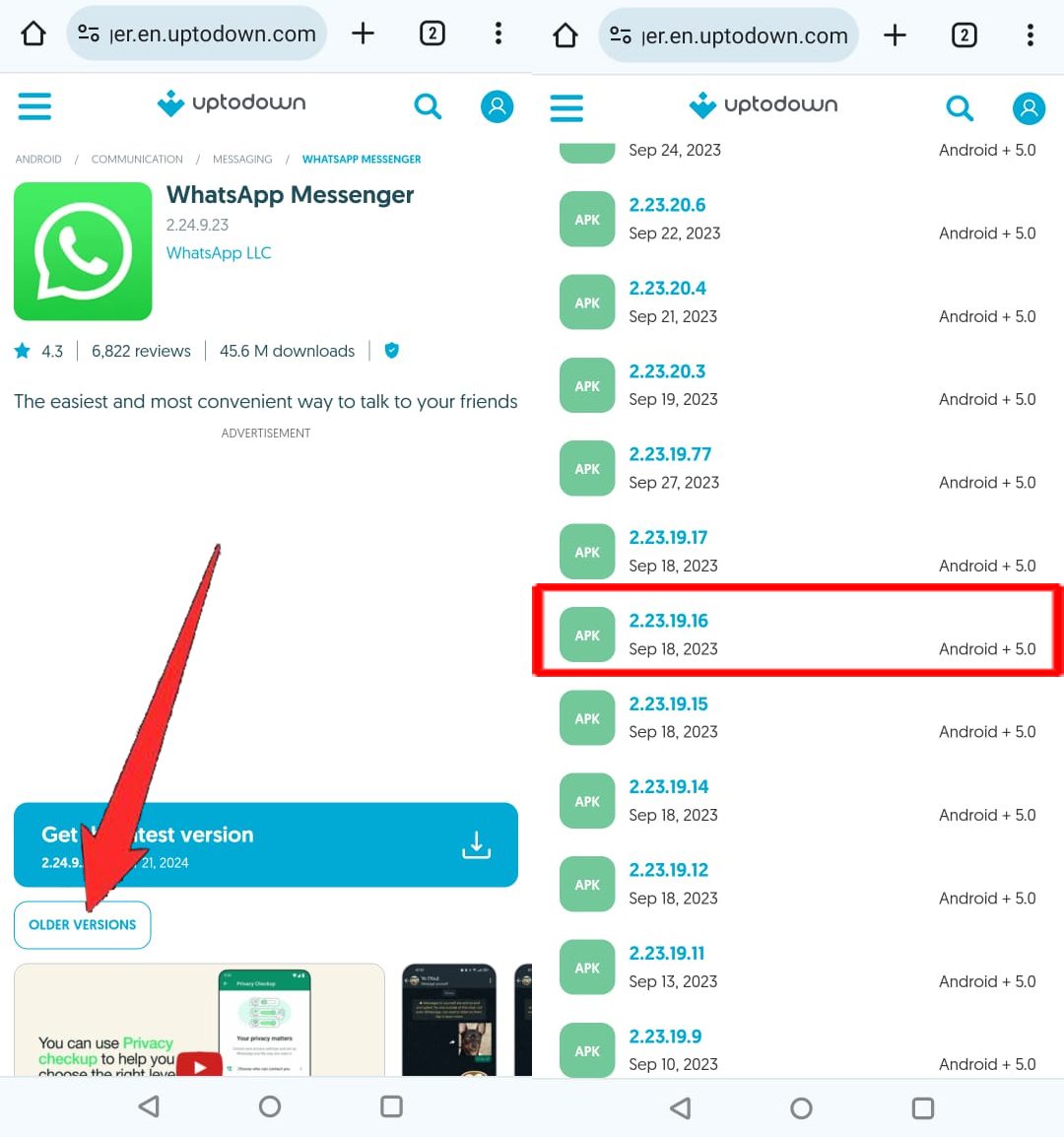
Step 5: Click on “Download” and then click on “Download anyway”.
It will say, the file might be harmful, but do not worry it is safe and secure.
Note: Here, if Chrome does not allow you to download the APK file, then you have to allow Chrome to install unknown apps, go to Settings > Security and privacy > More security and privacy > Installation sources > Chrome > Allow.
Step 6: Once the APK file gets downloaded, click on it and then tap on “Install”.
Step 7: Now, open WhatsApp and log into your account.
You can see that Meta AI has been removed successfully.
Note: Here, if you are prompted to update the app then do not update it or else Meta AI will get added.
Conclusion
Meta Ai is a virtual assistant and can assist you with your questions.
Meta has billions of users and it is now available on every Meta app such as Instagram, Facebook Messenger, and WhatsApp.
As there are so many users, some might like Meta AI and some might don’t.
Many users also asked us questions about how to turn off Meta AI.
So, to help you remove this feature, we have covered the steps of how to remove/disable/turn off Meta AI from WhatsApp.
I hope you found the guide helpful, if you do, then do share it with others.
You May Also Like:
- How To Remove Meta AI From Facebook Messenger
- How To Fix Meta AI Not Showing on WhatsApp
- How To Use ChatGPT In WhatsApp
- How To Find and Follow Channels on WhatsApp

Max Field is a founder of Recover Android Data. He is an Android lover and loves to write tips, tricks, fixes for errors, data recovery solutions and more related to Android.