

Are you getting a “Something went wrong. If this issue persists please contact us through our help center at help.openai.com” in ChatGPT?
Followed by: “There was an error generating a response. Regenarate response”.
The error occurs when you ask a query in ChatGPT.
It suggests that the model is unable to process the input or generate a response.
The error can occur due to multiple factors such as technical issues, bugs, browser/device issues, network problems, maintenance or updates, but it typically happens when the service is down.
In this article, you will learn how to fix ChatGPT error “Something went wrong. If this issue persists please contact us through our help center at help.openai.com”.
How To fix error “Something went wrong. If this issue persists please contact us through our help center at help.openai.com” In ChatGPT
To fix an error Something went wrong. If this issue persists please contact us through our help center at help.openai.com” In ChatGPT you have to follow these solutions:
- Check If ChatGPT Service Is Down/Under Maintenance or Having an Outage
- Refresh/Reload The ChatGPT Page
- Restart Your Device
- Clear Browser Cache
- Log Out and Log In To ChatGPT
- Try ChatGPT On Your Mobile Devices
- Try VPN
- Contact OpenAI Support
Fix #1. Check If ChatGPT Service Is Down/Under Maintenance or Having an Outage
Check the server status of ChatGPT.
- Visit – https://status.openai.com/ to check server status.

If ChatGPT is down/under maintenance or has an outage, then you have to wait until the server issue is fixed by the ChatGPT.
Fix #2. Refresh/Reload The ChatGPT Page
Just reload or refresh the ChatGPT web page and then check.
You can also open a new tab/incognito tab and visit ChatGPT website.
Fix #3. Restart Your Device
Just restart your PC/Mobile on whichever device you are using ChatGPT.
It is because restarting gives a fresh start and it fixes several minor/major issues.
So just restart your device and then check if the error is fixed.
Fix #4. Clear Browser Cache
- If you are using Google Chrome, then click on 3 vertical dots > Clear browsing data.
- Select time duration. Check mark “Browsing History”, Cookies and other site data, “Cached images and files” and then click on “Clear Data”.
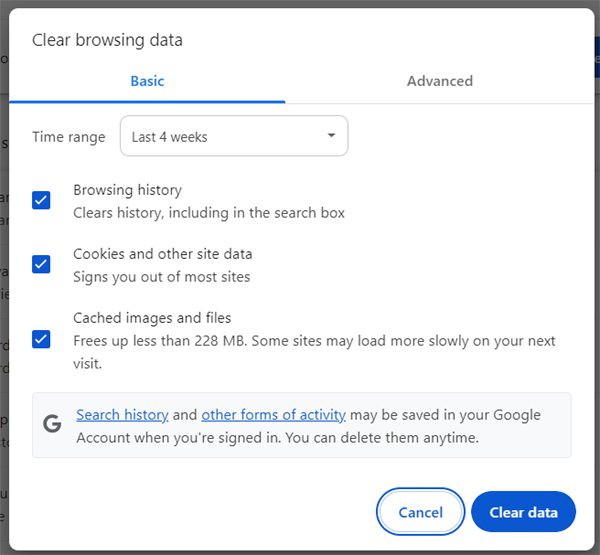
Note: You can also use another web browser to use ChatGPT.
Fix #5. Log Out and Log In To ChatGPT
Logout and login to see if it fixes the error.
- Visit – https://chat.openai.com.
- On the left sidebar click on “Log out”.
- Close your browser and then open it.
- Go to ChatGPT website, click on “Log in” and log in.
- Retype your query/prompt and send it and see if it responds or not.
Fix #6. Try ChatGPT On Your Mobile Devices
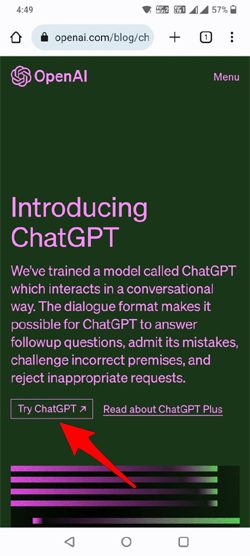
- On your phone, open Chrome or any other web browser.
- Go to openai.com and then tap on “Try ChatGPT”.
- Login into your account and start asking queries.
Fix #7. Connect/Disconnect To a VPN
If you are not using a VPN, then connect to a VPN and then try.
- On Mobile: You can open Play Store (for Android) or App Store (for iOS) and install a free VPN and connect to it.
- On PC: You can install any reputed free VPN and connect to it.
If you are already connected to a VPN, then disconnect it and then try ChatGPT.
Fix #8. Contact OpenAI Support
If all solutions fail for you, then it is time to contact Open AI customer support for further assistance.
- Go to https://help.openai.com.
- Click on the chat icon. Select “Search for help” and then click on “Send us a message”.
- Here select the appropriate topic for your issue.
- Describe your issue and send the message.
- Now, wait for the response from the support team.
Wrap Up
I hope by following solutions mentioned in this article have helped you to fix the error “Something went wrong. If this issue persists please contact us through our help center at help.openai.com” in ChatGPT.
If you have found this article helpful, then please share it as it can help other users!
Please support us by subscribing to our YouTube Channel.
You May Also Like:
- How To Use ChatGPT In WhatsApp
- How To Use ChatGPT On Android [Step-By-Step Guide]
- How To Fix “Message in conversation not found” Error In ChatGPT

Max Field is a founder of Recover Android Data. He is an Android lover and loves to write tips, tricks, fixes for errors, data recovery solutions and more related to Android. Provide Gaming Tips, Tricks, Game Error/Issues Solutions (PC/Xbox/PlayStation/Mobile). He is now also interested in solving LinkedIn Puzzles. He has 12+ years of experience in this field.