

In This Article, You Will Learn How To Enable Always-On Display (AOD) on Realme C17.
Steps To Enable Always on Display On Realme C17
Below follow the steps to turn on AOD option on Realme C17.
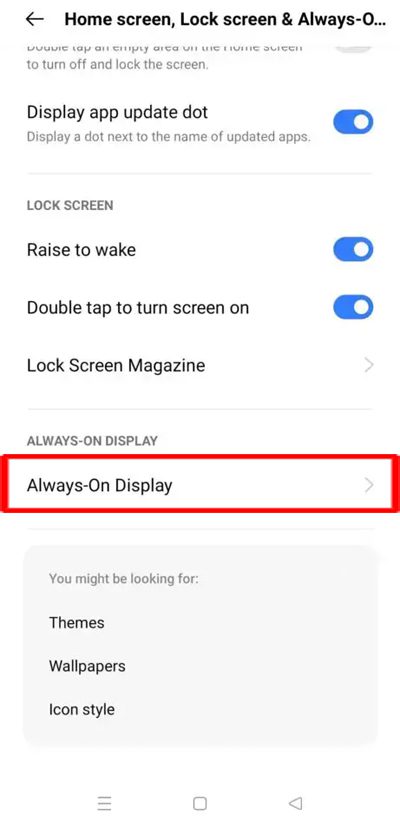
Step 1: On your Realme C17, go to Settings > Home Screen, Lock screen & Always-On Display.
Step 2: Scroll down and tap on Always-On Display.
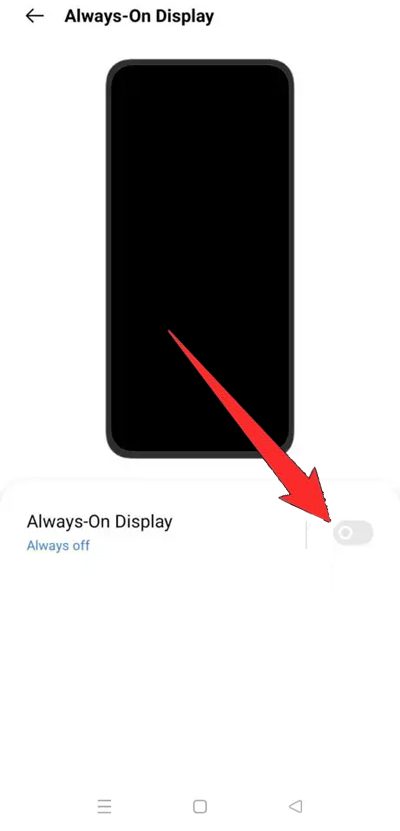
Step 3: Toggle the “Always-On Display” to ON position.
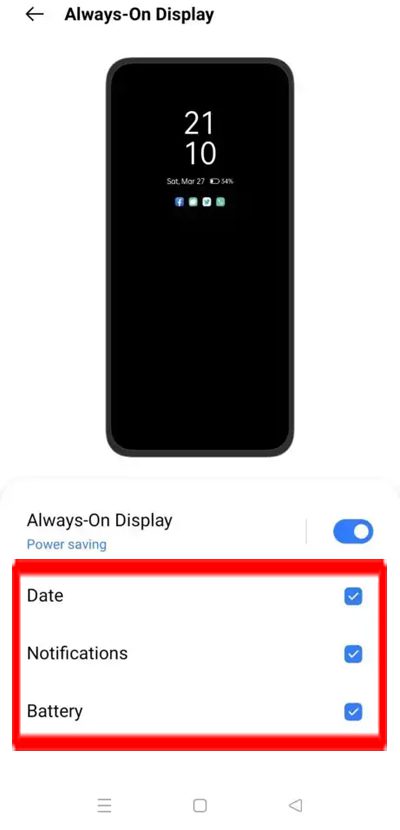
Step 4: Here you will have some option to show on Always on Display screen such as “Date”, “Notification” and “Battery”.
That’s It!
Steps To Disable Always-On Display on Realme C17
Just follow the above steps and just toggle the switch next to Always-On display to OFF position.
That’s All!
If you have found this article helpful, then please share it as it can help others!
Please support us by subscribing to our YouTube Channel.
You May Also Like:
- How To Backup And Restore Realme Phone Data
- How To Fix Edge Lighting Not Working On Realme Phone
- Realme Double Tap To Wake Not Working – Here How I Fixed It!
- How To Stop Pocket Dialing Emergency Number

Max Field is a founder of Recover Android Data. He is an Android lover and loves to write tips, tricks, fixes for errors, data recovery solutions and more related to Android. Provide Gaming Tips, Tricks, Game Error/Issues Solutions (PC/Xbox/PlayStation/Mobile). He is now also interested in solving LinkedIn Puzzles. He has 12+ years of experience in this field.