

Are you getting a notice on Instagram saying “You submitted an appeal”?
The second part of the notice says “It usually takes just over a day to review your information”.
Here’s the third part “Your account is not visible to people on Instagram, and you can’t use it”.
It will appear on your screen if you’ve submitted an appeal with your photo or video.
In this article, you will learn how to fix “You submitted an appeal” notice on Instagram.
Let’s start with the fixes.
How To Solve “You submitted an appeal” On Instagram
You have to wait for 1-3 business days until they review your appeal.
If the appeal is still not reviewed, then you should submit the “My Instagram Account Was Deactivated” form.
You can also subscribe to Meta Verified on Facebook and try contacting Support.
Fix 1. Wait For 1-3 Business Days
First, you need to submit an appeal with a video or photo of yourself, then wait for 1 to 3 business days.
Your account will be restored, if it follows Instagram’s TOS, if not, then it will get permanently disabled.
Fix 2. Submit “My Instagram Account Was Deactivated” Form
In this workaround, you need to submit another form, in case the appeal is still not reviewed.
Follow the below-mentioned steps to do so.
1: Go to the Instagram Help Center to submit another form.
2: You need to enter your name, Instagram username, your country followed by email address.
3: Now you need to explain your issue and explain that you did not violate Instagram’s TOS and that your account was deactivated by mistake.
4: Click on Send.
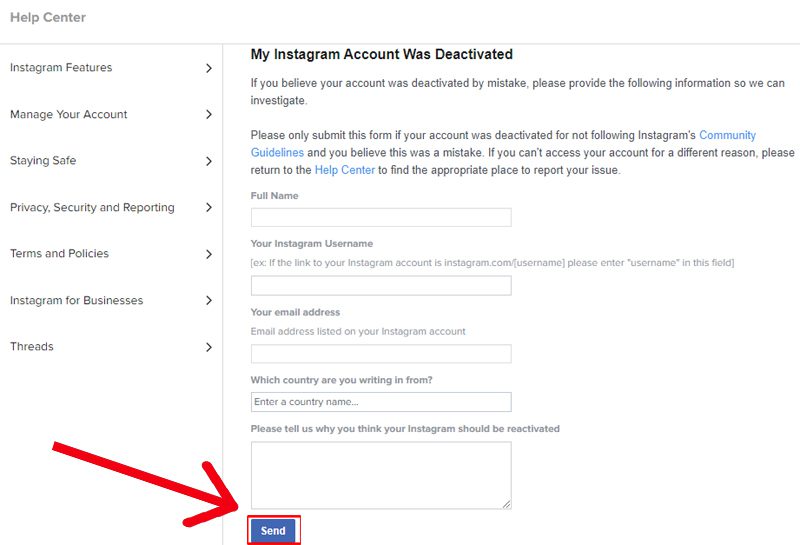
Now, you just need to wait for their response.
Fix 3: Subscribe To Meta Verified And Contact Facebook Support
In this workaround, you have to subscribe to Meta Verified and try contacting Facebook Support to explain the You submitted an appeal” problem.
These are the steps to follow.
1: Open the Facebook app and go to the Menu icon.
2: Expand Professional access and tap on Meta Verified, then subscribe to Meta Verified.
3: Return to the home page and tap on the Menu icon.
4: Now, hit the Arrow icon present beside your name.
5: Tap on Go to Accounts Centre > Meta Verified.
6: Choose your verified profile and tap on Get support.
7: Select the issue category, then select Live chat or Email.
8: Now, explain that you did not violate Instagram’s TOS and explain the issue in detail.
Now, wait for 1 to 3 business days for their response.
Conclusion
When the “You submitted an appeal. It usually takes just over a day to review your information” notice appears on Instagram, then your account will not be visible to anyone and even you can’t use it.
In this guide, we have covered all the possible ways to fix Instagram’s “You submitted an appeal” notice.
I hope you have followed the above steps carefully and submitted the form.
You need to be patient and wait for their response, if you don’t violate Instagram’s TOS, then it will be restored.
If you found this guide helpful, then do share it with others.
You May Also Like:
- How To Remove Meta AI On Instagram
- How To Fix Flipside Not Showing/Missing on Instagram
- How To Fix “Your Comment Has Been Removed” on Instagram
- How To Fix “Couldn’t add to template. Something went wrong” on Instagram

Max Field is a founder of Recover Android Data. He is an Android lover and loves to write tips, tricks, fixes for errors, data recovery solutions and more related to Android.