
Legend of Mushroom is a mobile game available on both iOS and Android.
Start an unexpected RPG adventure with the little mushrooms!
A magical lamp appears, shining on the ordinary mushrooms and turning them into a brave warrior.
Join alliances, eliminate the evil dragons, and become an elite adventurer.
In this game, there are mushroom characters that you can select with a quest to become human.
Enough with the game introduction, many users keep asking us “How do I change the server?”.
In this guide, you will learn how to change your region or server in Legend of Mushroom on Android or iOS.
Let’s begin with the steps.
How To Change Legend of Mushroom Server On Android and iOS
Open the Legend of Mushroom game on your mobile and follow the below-mentioned steps to change the server.
1: Launch Legend of Mushroom on your phone and go to your Profile Icon.
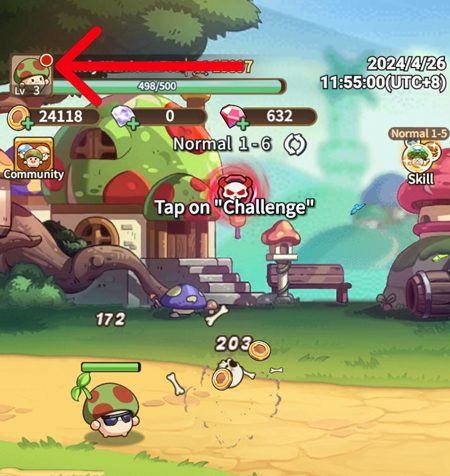
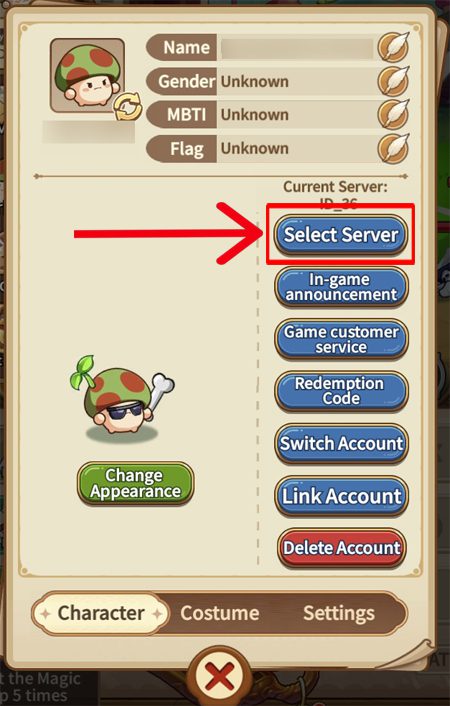
2: Tap on your Profile icon and choose Select Server.
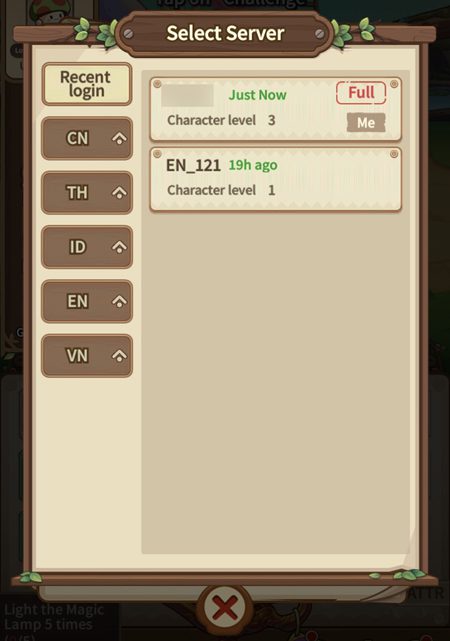
3: Now, choose the country you want to change to.
4: Choose the country’s server you want to change to.
5: Select the server you want to change to.
6: At Last, hit Confirm.
Your game will restart and the server will be changed.
Conclusion
Legend of Mushroom is a fun game to play where you can team up with your friends and use various equipment to become an elite adventurer.
You can select mushroom characters equipped with powerful spells to conquer everything that comes your way.
However, many users don’t know how to change the server in this game.
So, here are the complete steps to change the server or region in Legend of Mushroom for Android and iOS.
I hope you found this guide useful, if you do, then do share it with others.
You May Also Like:
- How To Fix FC Mobile Lag On Android and iPhone
- Fix Call Of Duty Mobile Log In Issue Due To Authorization Error
- Ways To Fix COD Mobile Controller Not Working
- Minecraft Pocket Edition (PE) Lagging On Mobile: Fix It Now!

Max Field is a founder of Recover Android Data. He is an Android lover and loves to write tips, tricks, fixes for errors, data recovery solutions and more related to Android. Provide Gaming Tips, Tricks, Game Error/Issues Solutions (PC/Xbox/PlayStation/Mobile). He is now also interested in solving LinkedIn Puzzles. He has 12+ years of experience in this field.