
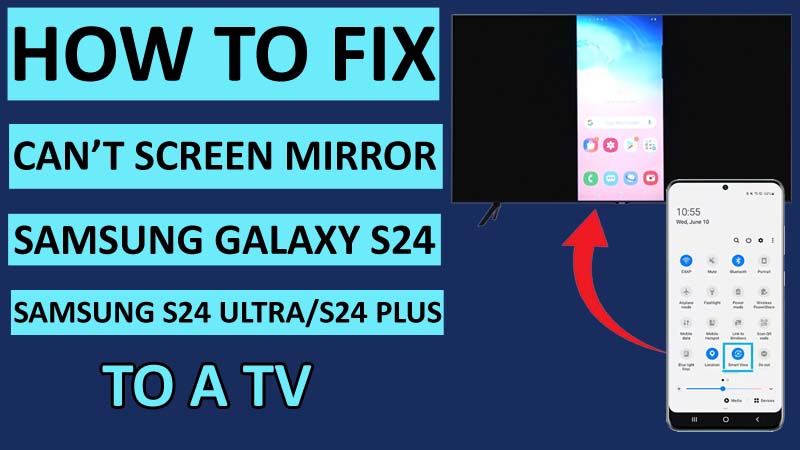
Are you facing any issues with the Samsung Galaxy S24/S24 Plus/ S24 Ultra screen mirroring to a TV or monitor?
With this rapidly growing technology, we have come this far that now we can watch anything on TV or monitor that we have been watching on our phone.
This feature is called Screen Mirror, with this feature, you can connect your phone wirelessly to your TV or monitor and enjoy watching anything on the big screen.
But what if your Galaxy S24 screen mirroring is not working? In this case, you won’t be able to experience the screen mirror feature.
If you are also one of the users who is facing the Galaxy S24/S24 Plus/S24 Ultra screen mirror issue, then you are in the right place.
Because, in this guide, we have provided all the possible solutions that you will need to solve the Galaxy S24 screen mirror issue.
But before we discuss the solutions, let us explore the potential causes that can be responsible for this problem.
Reasons: Why Can’t You Mirror Your Samsung Phone to TV?
The given below reasons could be the cause of this problem.
- Network Connectivity issues.
- Incompatibility.
- Not Updating Samsung Galaxy S24 or TV to the latest version.
- Malfunctioning Hardware.
- Faulty Settings on any of the devices.
You can use the solution according to the reasons causing the Galaxy S24 screen mirroring not working issue.
As you all are now familiar with the reasons, let us discuss the solutions to this problem.
How To Fix Can’t Mirror Samsung Galaxy S24/S24 Ultra/S24 Plus Screen To A TV
Fix 1: Restart Your Samsung Galaxy and TV
Restart can be a very simple yet effective method that you can use to solve this issue.
So, Turn OFF your Samsung S24 Ultra/S24 Plus/S24 and the receiving device.
After a few seconds, Turn ON both the devices and re-establish the connection between the devices to the screen mirror.
Fix 2: Connect Both Devices To The Same Network
When you connect your devices (Samsung Galaxy and Receiving Device) after restarting them, make sure you connect them to the same network.
You can check the connected network on your Galaxy phone by swiping down from the top of the screen and tapping and holding the WiFi button from the control panel to open WiFi settings.
If the network on your Samsung phone is not the same as your smart TV, then connect your phone to the same network as the smart TV.
Fix 3: Update Your Galaxy Phone and Receiving Device
If any of your devices are outdated then it could cause trouble.
So, you should check whether your devices are updated or not.
To update your Samsung Galaxy S24 software, open Settings then tap on Software Update > Download and install (If Available).
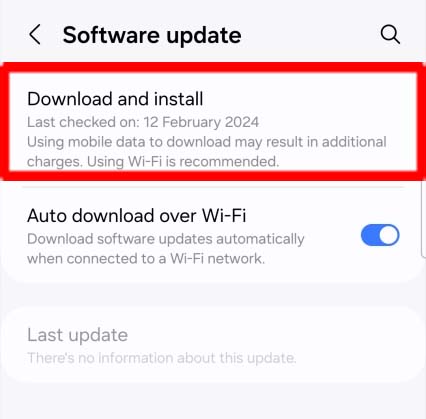
For the smart TV, go to the device’s settings or contact the manufacturers for the instructions to update.
Fix 4: Check Screen Mirroring Settings
Ensure that you have enabled screen mirroring on your Samsung Galaxy S24 Plus/S24/S24 Ultra.
If you haven’t enabled it, then here’s how to do so:
Step 1: Go to Settings.
Step 2: Tap on Connections > More connection settings > Screen mirroring.
Also, make sure to set your smart TV to accept screen mirroring connections.
Fix 5: Allow Permissions For The Receiving Device
It could be possible that you have been trying to connect your Galaxy phone to the smart TV without allowing permission for your smart TV.
To allow permissions for your TV, follow these steps:
Step 1: Swipe down from the top of the screen and open the Control Panel.
Step 2: Now tap on the Smart View icon.
Step 3: Select your TV and tap on ALLOW if your TV needs permission.
Fix 6: Use Cable for Screen Mirroring Connection
If you are still facing screen mirroring issues and can’t wirelessly screen mirror the Samsung Galaxy S24, then you should connect your phone to a smart TV using a cable with a compatible adaptor.
You can also use third-party screen mirroring apps for the connection.
Wrap Up
Screen mirroring is a very great feature that allows users to enjoy watching anything on the big screen wirelessly.
However, having a Samsung Galaxy S24 screen mirroring issue could be frustrating.
So, in this article, we have discussed all the solutions that can eventually help you fix the can’t mirror Galaxy S24/S24 Ultra/S24 Plus screen to a TV.
I hope you have followed all the steps carefully and you were able to solve the screen mirroring issue.
You May Also Like:
- How To See Your 2024 Snap Recap On Snapchat
- Fix Samsung S24/S24 Ultra/S24 Plus Low Audio/Sound During Calls
- Fix Unresponsive Screen on Samsung S24/S24 Plus/S24 Ultra
- How To Fix Copy Paste Not Working On Samsung Phone

Max Field is a founder of Recover Android Data. He is an Android lover and loves to write tips, tricks, fixes for errors, data recovery solutions and more related to Android. Provide Gaming Tips, Tricks, Game Error/Issues Solutions (PC/Xbox/PlayStation/Mobile). He is now also interested in solving LinkedIn Puzzles. He has 12+ years of experience in this field.