
Did your end-to-end encrypted chats get deleted on Messenger? Well, don’t bother because we got you!
Meta introduced End-to-end Encryption in Messenger in December 2023, aiming to protect our privacy. With this encryption, nobody can access your conversation with your friends or family except you.
Also, you can turn ON the secure storage and save your end-to-end encrypted chat history. You can also access your messages from other devices.
But, what if, your saved end-to-end encrypted chats got deleted accidentally? What will you do next? How will you recover them?
Well, I know how to restore them and I will share it with you!
To share the recovery process of end-to-end encrypted chats, I have prepared this article for all of you.
In this tutorial, you will learn how to restore or recover the end-to-end encrypted chats on Messenger.
So, shall we begin the article? Of course!
How To Restore End-to-end Encrypted Chats on Messenger
There is a way to restore those chats and that is via the Messenger app. So, let us discuss what are the steps to recover deleted end-to-end encrypted chats from the Messenger app.
Restore End-To-End Encrypted Chats on Messenger Via Settings
Note: You can only restore those messages that were deleted after the day you turned ON secure storage. To restore the messages, you need to turn ON secure storage before the deletion.
- Open the Messenger app on your phone.
- Tap on the 3 vertical lines > Settings (Gear icon).
- Select Privacy & safety > End-to-end encrypted chats > Message storage and make sure you have turned on secure storage before the deletion.
- Go back to the Settings list and scroll down till the end.
- Tap on See more in Accounts Center > Your information and permissions > Download your information.
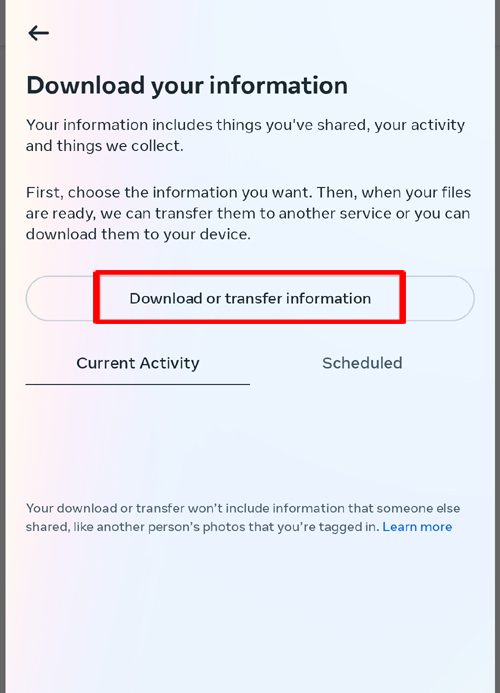
- Next, tap on Download or transfer information.
- Now, select the account on which you want to restore the chats.
- Select Specific types of information > Messages > Next.
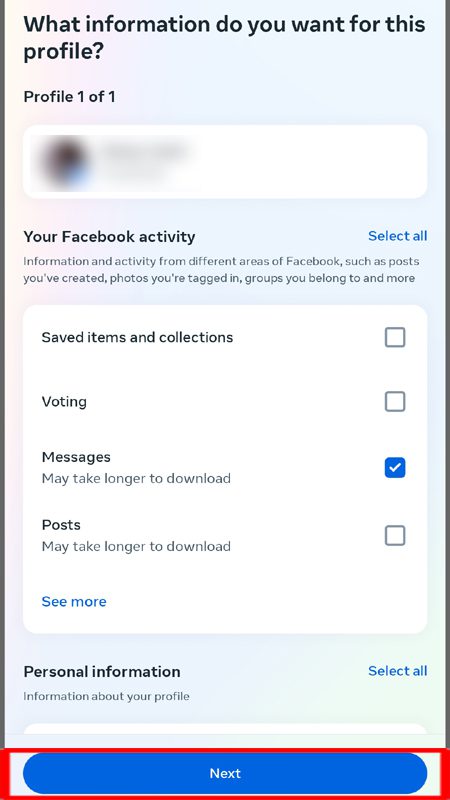
- Then, select Download to device > Next > Create files.
The request has been sent to restore the deleted chats. So, wait for the process to complete.
FAQs
Can encrypted messages on Messenger be recovered?
Yes, encrypted messages on Messenger can be recovered via settings inside the app.
How to reset the PIN used for data recovery?
Open the Messenger app and make sure to turn on secure storage. Tap on Menu > Settings > Privacy & safety > End-to-end encrypted chats > Secure storage > Reset PIN.
Wrap Up
End-to-end encryption is a very good feature as it protects your privacy and doesn’t allow others to access your conversation with anyone except you.
What a secure feature! Right? Well, yes, it is very beneficial for everyone because not everyone likes to talk about everything in every person.
But what if, you saved a conversation with somebody, and that end-to-end encrypted chat is missing? It could be accidentally deleted or must have been lost somewhere.
Anyway, whatever the reason is, you can still restore those chats if you have turned ON secure storage on the Messenger app.
And, to guide you to take the right steps one after another, we have brought this guide to you and that is “A Full Guide To Restore End-To-End Encrypted Chats on Messenger”
I hope you found this article helpful and were able to get back the lost end-to-end encrypted chats on Messenger.
You May Also Like:
- How To Turn Off End-to-End Encryption on Messenger
- How To Remove Meta AI From Facebook Messenger
- How To Fix Facebook Messenger Voice Messages Not Working

Max Field is a founder of Recover Android Data. He is an Android lover and loves to write tips, tricks, fixes for errors, data recovery solutions and more related to Android. Provide Gaming Tips, Tricks, Game Error/Issues Solutions (PC/Xbox/PlayStation/Mobile). He is now also interested in solving LinkedIn Puzzles. He has 12+ years of experience in this field.