

In This Article, You Will Learn How To Fix “Only friends can send messages to each other” on TikTok.
How To Fix “Only friends can send messages to each other” on TikTok
Fix 1. Change Privacy Settings on TikTok
- Open TikTok app and click on your Profile icon.
- Go to Menu > Settings and privacy.
- Tap on Privacy > Interactions.
- Click on “Direct messages”. Here, select “Everyone”.
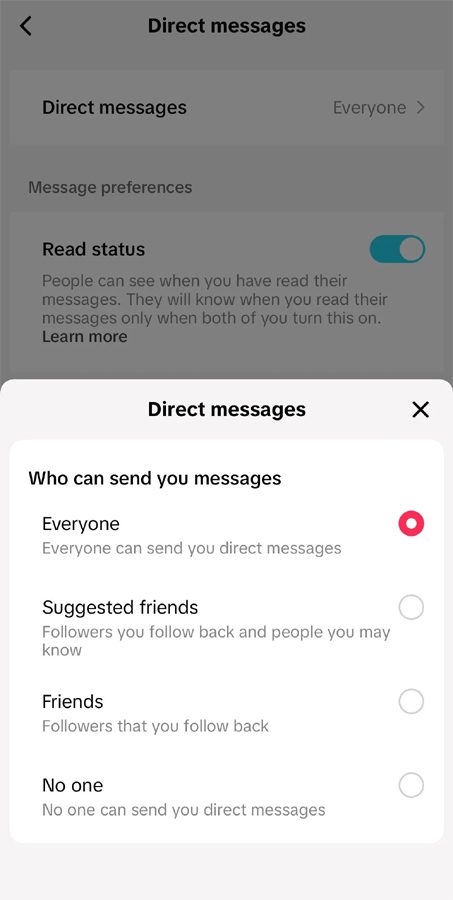
Note: If still you are not able to send message to your friends, then ask them to follow the same steps to change their privacy settings.
Fix 2. Change Age To 16 and Above on TikTok
- Go to: https://www.tiktok.com/legal/report/feedback
- Under “Topic”, select “Change account information”
- Under “Category”, select “Other”.
- Enter your email id and your TikTok username.
- In “Additional details” box explain that you’ve set your birthday incorrectly and you want to change it so that you’re above 16 years old.
- In the “Attachments” section, upload a photo of your ID for verification purpose.
- Check mark both the declaration box and finally click on “Submit” button to submit the form.
- Now, wait for TikTok’s reply. It may take 24 hrs – 72 hrs.
Note: If you still can’t send the messages to your friends then ask them to change their age above 16 on TikTok by following the same steps, if your friend accidentally set their age to under 16.
Fix 3. Follow Each Other On TikTok
- Follow the user or friend to whom you want to send direct messages on TikTok.
- Wait for the user or friend to follow you back. Or ask them to follow you back, so that you can send direct messages.
- Once the user/friend follows you back, you will then be able to send messages to them.
If you have found this guide helpful, then please share it, as it can help others!
Please support us by subscribing to our YouTube Channel.
You May Also Like:
- How To Fix “Cannot send messages due to this user’s privacy settings” on TikTok
- 5 Ways To Fix TikTok Asking For Passcode
- TikTok Not Uploading Videos – Fix It Now!
- How To Get Unshadowbanned On TikTok

Max Field is a founder of Recover Android Data. He is an Android lover and loves to write tips, tricks, fixes for errors, data recovery solutions and more related to Android. Provide Gaming Tips, Tricks, Game Error/Issues Solutions (PC/Xbox/PlayStation/Mobile). He is now also interested in solving LinkedIn Puzzles. He has 12+ years of experience in this field.