
Minecraft is a 3D sandbox game published and developed by Mojang Studios. Players can experience and play in a virtual three-dimensional world made up of voxels.
You can extract and discover raw materials, and build structures, earthworks, machines, and craft items and tools. Players can fight hostile mobs as well as cooperate with or compete against other players depending on their chosen game mode.
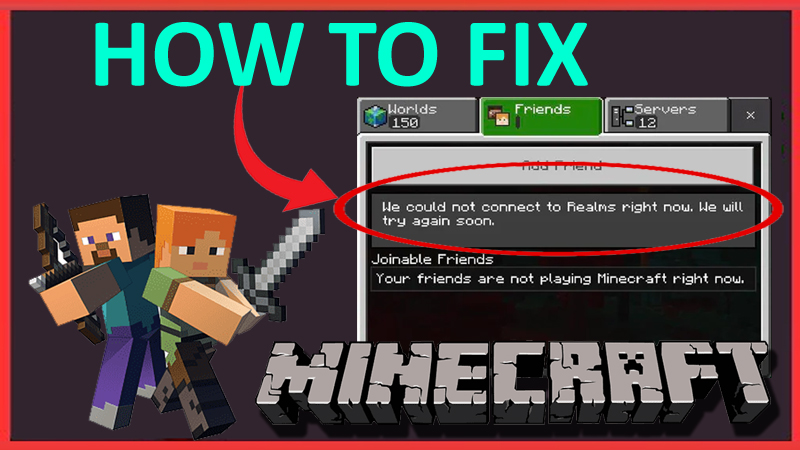
Many players play Minecraft and love it. However, some users have spotted an error in which they are unable to play realms. The error says “We could not connect to Realms right now”.
Minecraft Realms is a type of server that you personalize and play with your friends locally or online. Only invited friends can play in your realm.
Unfortunately, some users cannot connect to realms. And if you are also one of those users finding the solutions for this issue then you are in the right place.
In this guide, I will guide you to take appropriate steps and solutions to fix “We could not connect to Realms right now” in Minecraft.
Read carefully and follow every step properly to fix the issue with 100% efficiency.
How to Fix Minecraft “We could not connect to Realms right now” Error
Fix 1: Check Minecraft Server Status
If the Server Status of Minecraft is down or has outages, then this error can occur.
Go to: https://x.com/MojangStatus
And check if the Minecraft server status is under maintenance. If true, then you must wait for the outage to resolve.
Fix 2: Check Xbox Live/PlayStation Network Status
You must also check if Xbox Live or PlayStation Network are running and not down if you are playing on them.
You can check this by visiting their official sites: Xbox Live Status & PlayStation Network Service Status.
Fix 3: Change Network Connection
First of all, you must have a strong and stable Network connection.
If you are using Mobile data then switch it to any Wi-Fi connection.
If you are using a Wi-Fi connection then switch it to your Mobile data.
Fix 4: Restart Your Device & Minecraft
When you encounter this error, restart the Minecraft game and your device.
Simply, exit Minecraft and restart your device. After waiting a couple of minutes, launch the game again and check if the error is gone or not.
Fix 5: Check for Game Updates
Most of the error occurs if the game is not updated.
So, you are suggested to check for the game update If any new update is available, then you should install the update and launch the game again.
Fix 6: Sign Out & Into Your Microsoft Account
- Navigate to Settings > Profile.
- Now, sign out from your Microsoft account.
- Wait for a few minutes and sign back into your account.
- Relaunch the game and check.
Fix 7: Connect to a VPN
Another method you can try is to connect your device to any reputed VPN.
If you have already connected to VPN then try to disconnect the VPN and try again.
Fix 8: Clear App Cache for Minecraft (For Mobile only)
On Android:
- Navigate to Settings > Apps > All apps/Manage app
- Now, find Minecraft and tap on it.
- Next, tap on Storage > Clear Cache.
On iPhone:
- Open Settings and tap on General > iPhone Storage.
- Find Minecraft and tap on it.
- Now, tap on the Offload App and confirm it.
- Tap on Reinstall App to reinstall Minecraft.
Fix 9: Uninstall & Re-install Minecraft
If any solution isn’t working, you should uninstall and re-install the game.
Uninstall the game from whichever platform you are playing on and re-install the game.
After that check if you can connect to realms or not.
Fix 10: Contact Minecraft Support
If re-installing the game too failed to fix the error then the last option will be contacting the Minecraft Support
Explain your issue and they will help you further.
Wrap Up
Minecraft is a very popular and interesting game.
However, an error took place and many players are worried about it since they are unable to connect to Realms and invite their friends.
The error says “We could not connect to Realms right now, ” which means you cannot connect with the Realm server.
So, what should one do to fix the problem? Well, I have the answer and to get that answer all you have to do is read this carefully to unfold all the possible solutions to fix the problem.
I hope you read and follow the solutions carefully and managed to fix the “We could not connect to Realms right now” error in Minecraft.
You May Also Like:
- How To Record Minecraft With OBS For Free
- Minecraft Pocket Edition (PE) Lagging On Mobile: Fix It Now!

Max Field is a founder of Recover Android Data. He is an Android lover and loves to write tips, tricks, fixes for errors, data recovery solutions and more related to Android. Provide Gaming Tips, Tricks, Game Error/Issues Solutions (PC/Xbox/PlayStation/Mobile). He is now also interested in solving LinkedIn Puzzles. He has 12+ years of experience in this field.