

Meta’s Facebook users are experiencing issues with “Back button” not working on Facebook.
This issue can be noticed when a user tries to use the back button to go back to a previous screen or page within the Facebook app.
Nevertheless, the back button does not work as it should and the user is instead stuck on the current page/screen.
This problem is mostly faced on Android devices, particularly on Samsung and Xiaomi.
This issue started to occur after the latest Facebook update that broke the back button.
In this article, you will learn how to fix Facebook back button not working.
Also Read: [FIXED] “Unfortunately, Facebook Lite Has Stopped” On Android
How To Fix Facebook Back Button Not Working
To fix back button not working on Facebook, you have to follow these solutions:
- Press and hold back button for 1-3 seconds.
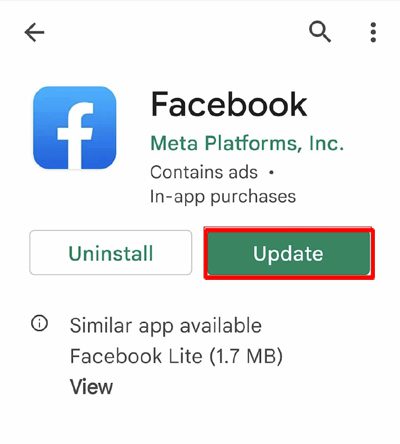
- Check for the new Facebook App update.
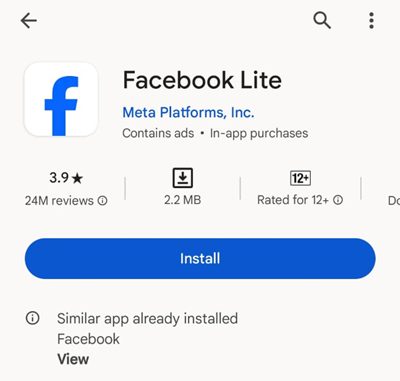
- Try Facebook Lite.
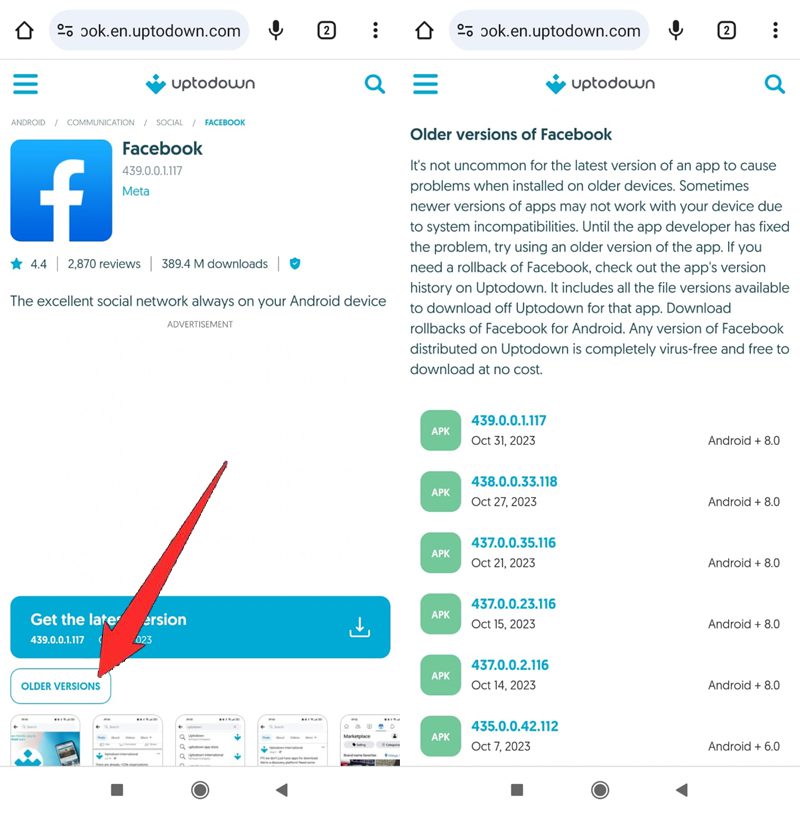
- Download an older version of Facebook.
Solution 1: Press and Hold Back Button For 1-3 Seconds
This is the most successful solution that has been working for many users.
Press and hold the back button for 1-3 seconds, instead of tapping the back button once.
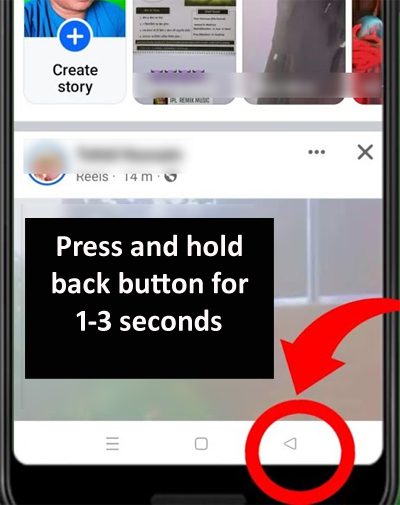
This works on many Android devices.
This workaround will temporarily or permanently fix the issue afterward.
Also Read: How To Fix Messenger Bubble/Chat Head Not Showing
Solution 2: Check For The New Facebook App Update
This issue was noticed after the Facebook app update and the update was having a bug and due to this back button is not working in the Facebook app.
Meta is aware of this issue and they will release the new update, hence you must check for the new update for the Facebook app and if it is available, then update it.
- Go to Play Store.
- Search for Facebook.
- Tap Update.
Solution 3: Install Facebook Lite
There is an alternative option available for you.
You can install Facebook Lite and use it without any issues.
- Open Google Play Store.
- Search for Facebook Lite.
- Tap on Install.
- Once installed, open Facebook Lite and log in to your account.
- Use the back button, you will not face any problems.
Also Read: How To Fix “Unfortunately, Messenger Has Stopped” Error on Android
Solution 4: Download an Older Version of Facebook
If you want to then you can download and install an older version of Facebook and get rid of the back button not working on Facebook.
- First of all, uninstall Facebook from your device.
- Go to – https://facebook.en.uptodown.com/android.
- Click on “Older versions” and download an older version of Facebook (APK).
- Open Facebook, log into your account, and the back button should be working now.
Wrap Up
While the Facebook ‘Back Button’ not working could be frustrating, the solutions mentioned in the post might help you to fix the issue.
If you have found this post helpful, then please share it as it can help other users!
Please support us by subscribing to our YouTube Channel.
You May Also Like:
- How To Fix Facebook Account Locked Due To Suspicious Activity
- How To Poke Someone On Facebook [Simple Steps]
- Turn OFF Facebook “Suggested For You” Posts On Android, iPhone
- How To Import Birthdays From Facebook To Google Calendar

Max Field is a founder of Recover Android Data. He is an Android lover and loves to write tips, tricks, fixes for errors, data recovery solutions and more related to Android. Provide Gaming Tips, Tricks, Game Error/Issues Solutions (PC/Xbox/PlayStation/Mobile). He is now also interested in solving LinkedIn Puzzles. He has 12+ years of experience in this field.