

Is your Redmi Note 10 Pro or Note 10 Pro Max camera not working or not opening?
When you try to switch from the rear camera to the selfie it gets stuck. A black screen error occurs.
Or are you experiencing that your Redmi Note 10 Pro Max/Note 10 camera has stopped working after the update?
If so, then in this article you are going to learn some effective solutions that will help you to fix Redmi Note 10 Pro/Note Pro Max front camera not working problem.
So, let’s get started with real user practical examples!
Practical Example 1: Selfie Camera Freezes or Crashes When Switching From Rear To Front on Redmi Note 10 Pro
My Redmi Note 10 Pro front camera isn’t working I have a Redmi Note 10Pro, its almost 1 year old now. I tried opening the camera app today but i noticed that the front camera isn’t working. Whenever I switch from rear to front it always freezes and crashes the camera app. Also other apps like instagram, tiktok or snapchat, whenever i try to open the camera in those apps, it just shows a black screen. Is there anyway to fix this? I tried clearing data and cache but it also didn’t work. Source: Reddit
Practical Example 2: Redmi Note 10 Pro Front Camera Problem
Redmi Note 10 Pro – Front Camera Problem! After I updated my Redmi Note 10 Pro to the latest version of Security Patch from Miui 13 Android 12, the front camera no longer worked. I downgraded to Miui 12 but it still doesn’t work, someone help me? Source: XDA Developer Forums
So, that are just two examples, but there are many users out there encountering such issues. Many users are reporting or complaining about the issue to several forums and community websites such as Reddit, Twitter, Xiaomi Community and on other platforms.
Also Read: Fix Picture/Video Distortion Issue From A Samsung Phone’s Camera
Why Front Camera of Redmi Note 10 Pro/10 Pro Max Is Not Working?
There could be possibly two reasons for the front camera not working on the Xiaomi Redmi Note 10 Pro or 10 Pro Max and they could be – Software or Hardware issues.
Software issues might include – Camera app bugs, Cache or temporary files that might have been corrupted. Camera app settings might have been modified. Your phone software might be outdated and so on.
Hardware issues might include – Physical damage to the device, particularly the front camera might have got damaged. It could happen when your phone has fallen or water/dust particles have entered to the front camera area.
For software issues, you can follow the solutions mentioned in this article.
For hardware issues, you can carry your device to the nearest Xiaomi Service Centre for a checkup.
How To Fix Front Camera Not Working On Redmi Note 10/10 Pro Max
Before you follow any of the solutions, it is recommended that you first backup your phone’s photos and videos to some other place.
So, here we go!
Solution 1: Check For Software Update
Mi releases the software update at regular intervals, particularly when users face any bugs in the recent software update.
The new software update is released to fix the bugs and other issues, such as the camera not working problem.
- On your phone, go to Settings > About Phone.
- Tap on MIUI Version. The device will look for new updates or you can tap on “Check for updates”.
- If there is any new update available, then download and install it.
Once, your device is updated, check if your phone’s front camera is working or not.
Solution 2: Reset Your Camera Settings
It could also be possible that your device’s camera settings might have been altered/changed.
Resetting the camera to the default setting might fix the problem.
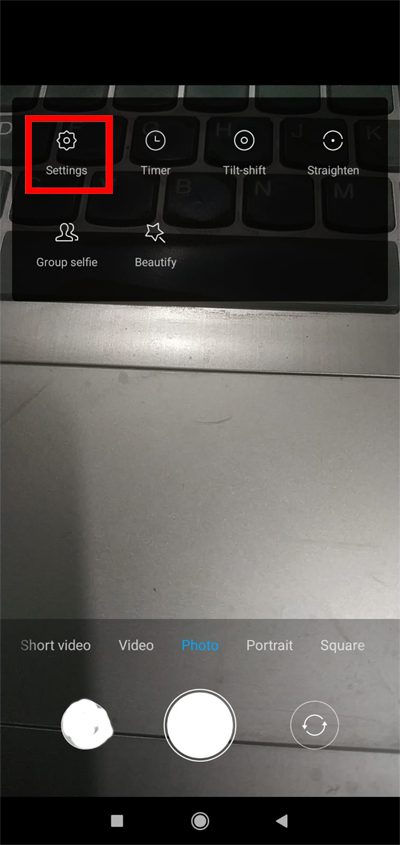
- Open camera app on your phone.
- Click on 3 horizontal lines located at the upper right corner and then tap on “Gear” icon to open camera settings.
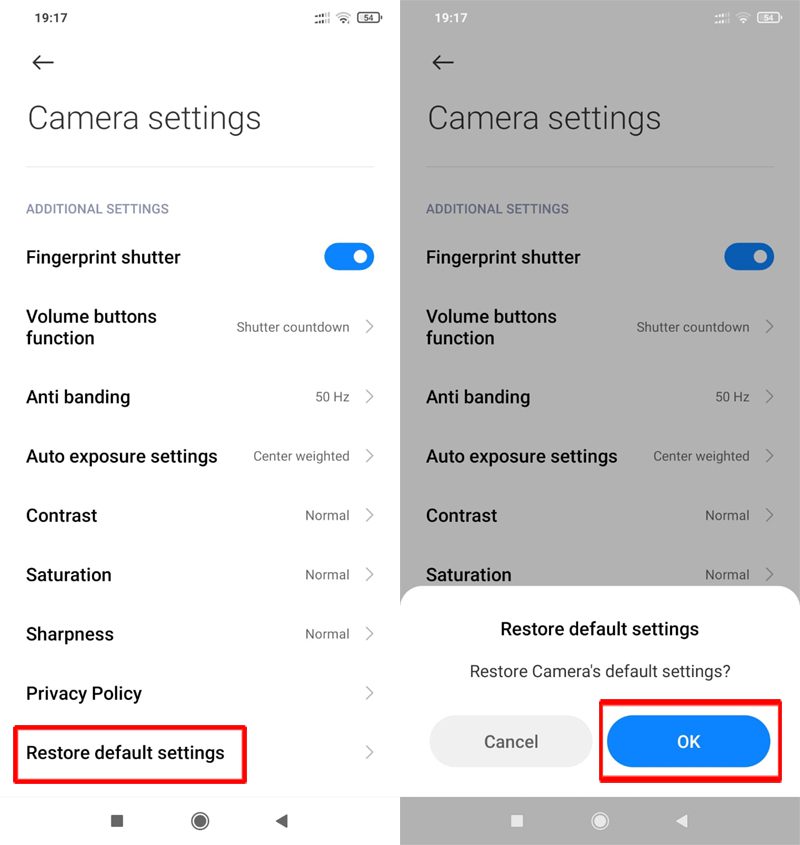
- Scroll down and tap on “Restore default settings” and then tap on “Ok” to confirm.
Also Read: How To Fix Instagram Camera Not Working On Android
Solution 3: Clear Cache and Clear Data Of Camera App
Sometimes the cache or temporary files of the camera app might get corrupted and the app stops working.
So, clearing the data might help to resolve the issue.
- On your phone, go to Settings > Apps > Manage Apps.
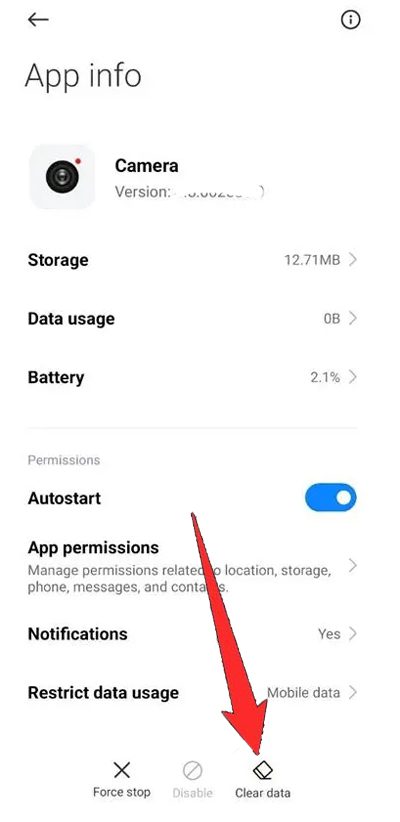
- Look for camera app and tap on it.
- Tap on “Clear data”.
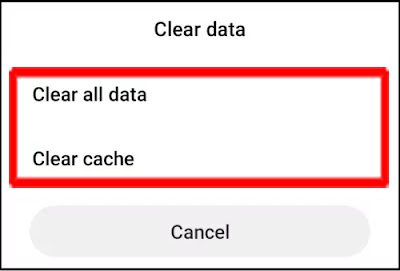
- Then tap on “Clear all data” and “Clear cache” options.
Restart your device. Open the camera app switch to the selfie camera and see if it is working fine or not.
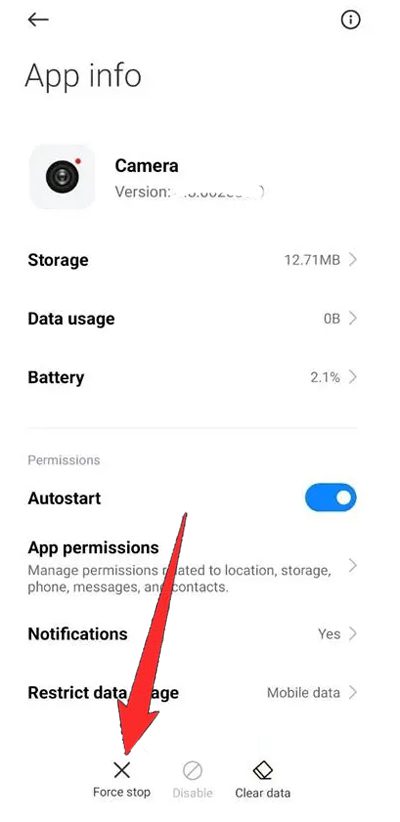
Solution 4: Force Stop Camera App
- On your phone, go to Settings > Apps > Manage Apps.
- Look for camera app and tap on it.
- Tap on “Force stop”.
Also Read: Turn OFF Camera Shutter Sound On Samsung S23 Ultra/S22 Ultra/S21 Ultra
Solution 5: Make Sure All The Required Permission For Camera App Is Granted
If any camera app required permission is denied then it will not work. Hence, make sure that the required permission is granted.
- On your phone, go to Settings > Apps > Manage Apps.
- Look for camera app and tap on it.
- Tap on “App permission”.
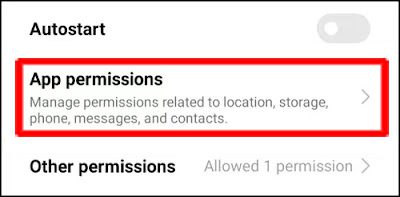
- Make sure all the permission is Allowed.
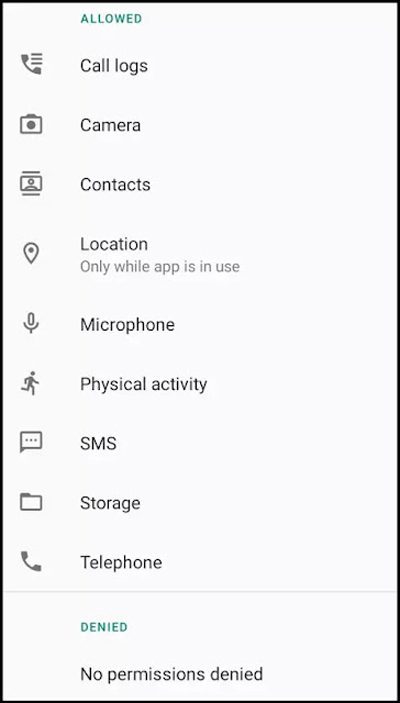
Restart the device. Open the camera app, switch to the front camera and I hope your problem is solved now.
Solution 6: Factory Reset Your Redmi Note 10 Pro/10 Pro Max Phone
If none of the above solutions work for you, then it’s time to factory reset your device and then check.
Note: Factory reset erases all data, hence it is highly recommended that you must first take a backup of your device’s data and then perform this solution.
- Open Settings app.
- Tap on About Phone > Factory reset > Erase all data.
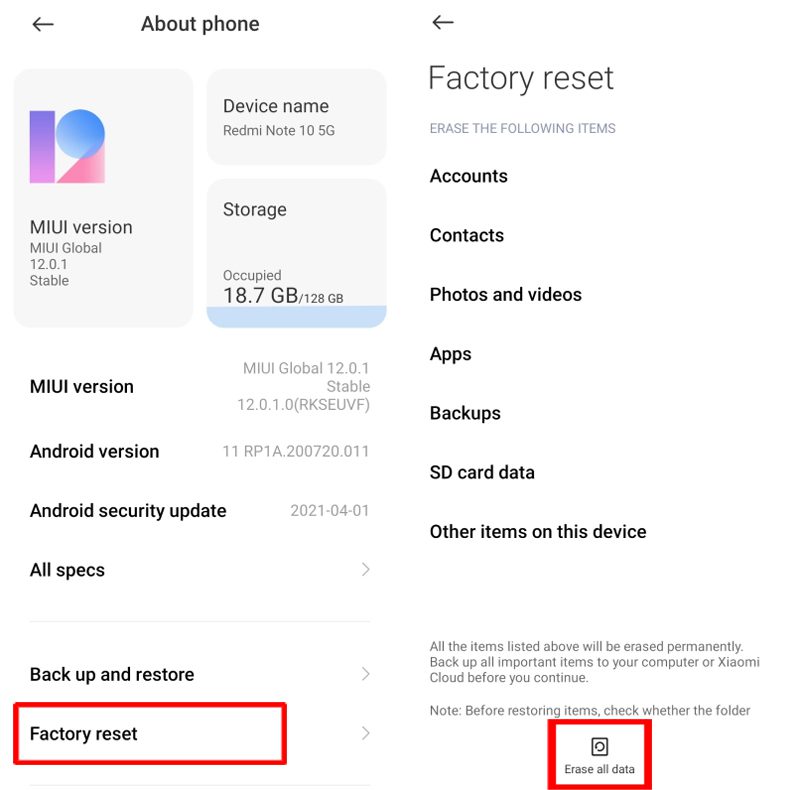
- Tap on Factory Reset > Next > OK.
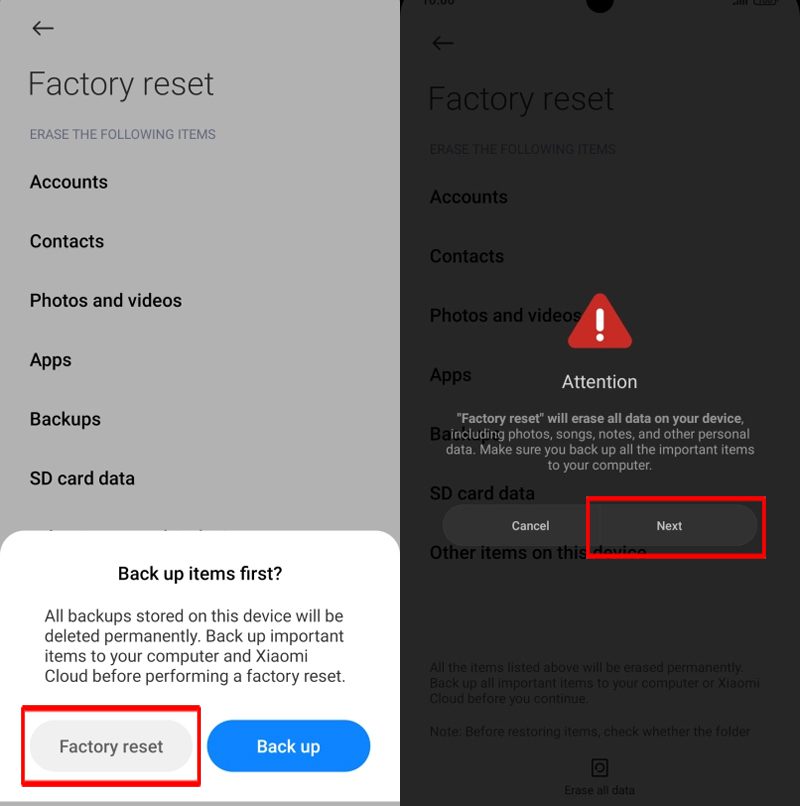
Allow your phone to do a factory reset. Once the process completes, set up your device and then check camera problem is resolved or not.
Wrap Up
When you want to take selfies, make video calls or when you want your Redmi Note 10 Pro/10 Pro Max’s front camera to work but you find that it is not working at all, then you might get frustrated and annoyed.
However, following the fixes mentioned in this article would definitely help you to fix front camera not working on Xiaomi Redmi Note 10 Pro or Redmi Note 10 Pro Max phone.
If you have found this post helpful, then please share it as it can help other users.
Please support us by subscribing to our YouTube Channel.
You May Also Like:
- How To Fix Front Camera Not Working On Android
- How To Fix Security Policy Prevents Use Of Camera On Android
- How To Fix Phone Camera Making Buzzing Noise
- How To Repair “Camera Failed” Error On Samsung Phone

Max Field is a founder of Recover Android Data. He is an Android lover and loves to write tips, tricks, fixes for errors, data recovery solutions and more related to Android. Provide Gaming Tips, Tricks, Game Error/Issues Solutions (PC/Xbox/PlayStation/Mobile). He is now also interested in solving LinkedIn Puzzles. He has 12+ years of experience in this field.