

Is your Google Voice outgoing calls failing? Is the app displaying an error message: “Can’t connect your call – Google Voice couldn’t place your call”?
If “Yes”, then you have landed on the right web page. Here you learn different solutions that can help you to fix Google Voice outgoing calls failing. Just go through the post and apply the solutions one by one.
Let’s start with a real user practical scenario!
Practical Scenario: Google Voice Outgoing Calls Fail Sometimes Incoming Calls As Well
Hi.
My #ends in 9969, I use an android p10. It worked fine with t-mobile until they made me switch service (I only travel to the US a few times a year for several weeks).
When I am abroad and on wifi, I can initiate and receive calls from the app.
When here in the US, and with a now new SIM from Roammobility with data or just over wifi, whether I select carrier or wifi/data, the outgoing calls fails. I received one call but happened to be on my pc and the phone didn’t ring, so I picked it up on the pc, so my guess is that I can t receive either.. Texting works fine.. Please help!
Practical Scenario Is From – Google Voice Help Community
That was just one scenario, similarly there are several users out there encountering the same issues.
Anyway, let’s just dive into the solutions that can help you to fix Google Voice outgoing calls failing/can’t connect your call or when you hear “number is not in service” when you make an outgoing call via Google Voice app.
Also Read: How To Fix “Unfortunately, Voice Command Has Stopped” On Android?
Solution 1: Change Data Settings On Your Google Voice App
The data settings that you have configured on the app are responsible for choosing how your call is placed. So, if you have configured the wrong data settings, it is most likely that you may face an error and Google Voice won’t be able to make calls.
Hence it is suggested that you must select both – Prefer Wi-Fi and mobile data to make and receive calls.
Below follow the steps to do so:
- Go to Google Voice
- From the top-left corner, tap on the Menu
- Tap Settings.
- Here, select the option “Prefer Wi-Fi and mobile data”.

Now, check if this fixes your problem.
Solution 2: Clear Google Voice App Cache
Every app stores temporary files on the device, these are called cache files. These files basically store the general app settings. But, in some cases when these cache files get damaged or corrupt or have some bugs, then you may start to face issues
So, the simple and quick solution here is to clear the app cache. Well, you don’t need to worry as clearing app cache doesn’t delete any of your data.
Below follow the steps to do so:
On Android:
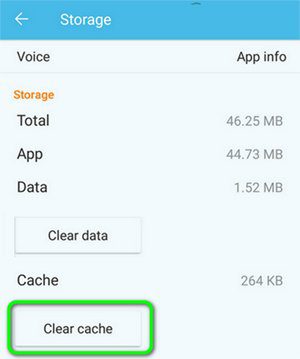
- Go to Settings> Apps/All Applications. Alternatively, go to Storage> Other Apps.
- Now, from the app list, look for Google Voice and tap on it.
- Tap on Storage and then tap on “Clear Cache”.
On iPhone:
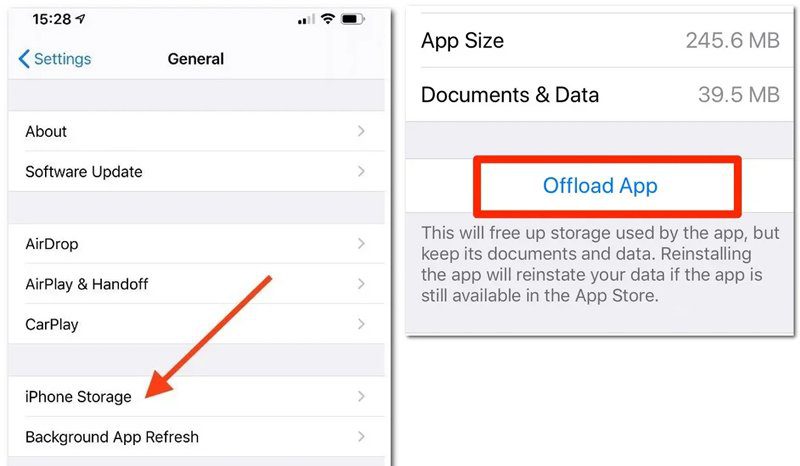
- Go to Settings> General.
- Tap on iPhone Storage.
- Now, from the list of apps, look for Google Voice and tap on it.
- Here tap on “Offload App”.
Once, you clear the cache files, try to place the call again.
You May Also Like:
- Fix Wi-Fi Calling Not Working On Samsung Galaxy S20 (Plus)/S20 Ultra
- How To Fix Incoming Call Not Showing On Android Phone Screen
- How To Retrieve Deleted Voice Recordings On WhatsApp
- How To Delete Call Logs Permanently From SIM Card On Android
Solution 3: Update Google Voice App (If Update Available)
Updating the app at regular intervals is a good habit as it brings new features as well as it changes certain aspects of the app. Hence, if you are using an outdated version, then it might not function properly.
Hence, it is always suggested that you must update your app as and when any new update comes. Believe me updating the apps fixes many issues and problems.
So, check if any updates available for your Google Voice app or not. If available, then update it and then check if you are able to make calls or not.
Other Basic Solutions To Fix Google Voice Outgoing Calls Failing
- Check your Google Account.
- Check your credit. Google Voice is free in some regions and in some regions it is chargeable. See the list here – Google Voice Calling Rates.
- Allow all the required Google Voice app permission on your mobile devices. Make sure that you have given permission for Outgoing Calls as well as Incoming Calls.
- Check if Google Voice is down.
- Reinstall Google Voice App.
Wrap Up
Well, a large number of users use Google Voice as it helps them to keep in touch with friends, family, and colleagues. But when you see that Google Voice is not able to make calls or outgoing calls are failing, then it becomes very annoying.
However, from the above-mentioned solutions, you can solve the issues in a minute and start making calls again using Google Voice.
Please support us by subscribing to our YouTube Channel.
If you have found this article helpful, then do share it, as it can help other users.

Max Field is a founder of Recover Android Data. He is an Android lover and loves to write tips, tricks, fixes for errors, data recovery solutions and more related to Android. Provide Gaming Tips, Tricks, Game Error/Issues Solutions (PC/Xbox/PlayStation/Mobile). He is now also interested in solving LinkedIn Puzzles. He has 12+ years of experience in this field.