

Telegram is an instant messaging app for simple, fast and secure communication.
Do you know that you can send disappearing chats, photos and other media on Telegram?
You can send expiring photos in Telegram with a timer – 3 seconds, 10 seconds or 30 seconds.
Once the timer ends, the photo self-destructs and the recipient will not be able to view it again.
Well, if you don’t know how to send expiring, self-destructing or disappearing photos on Telegram, then this article guide you with the right steps to do so.
Steps To Send a Disappearing Photo on Telegram
Here, follow the steps on how to send a disappearing picture or photo on Telegram.
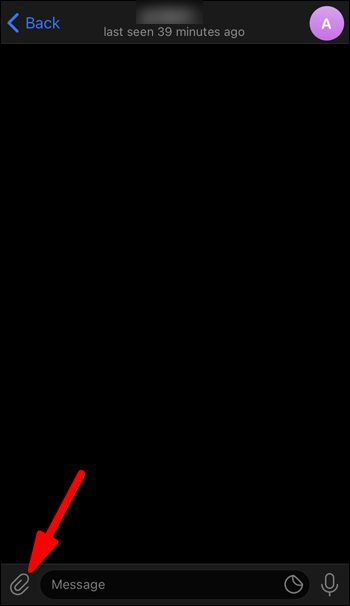
Step 1: Open Telegram app and go to the chat in which you want to send a disappearing photo.
Step 2: Tap on “Attachment” icon.
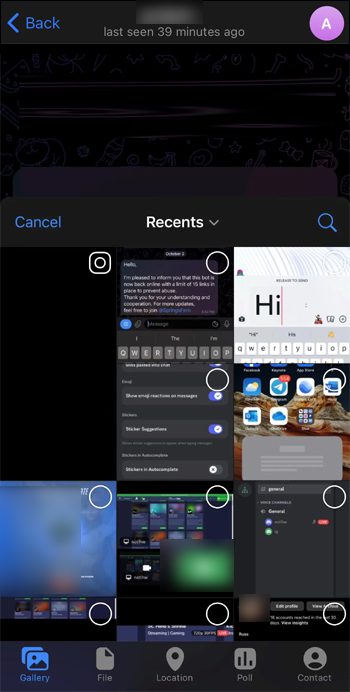
Step 3: Choose a photo that you wish to send.
Step 4: Next, tap on the “Timer” icon.
Step 5: Select the timer on how long the photo will be kept once it is opened (for example – 3 seconds, 10 seconds, 30 seconds).
Step 6: Finally, tap on “Send” icon to send a disappearing photo.
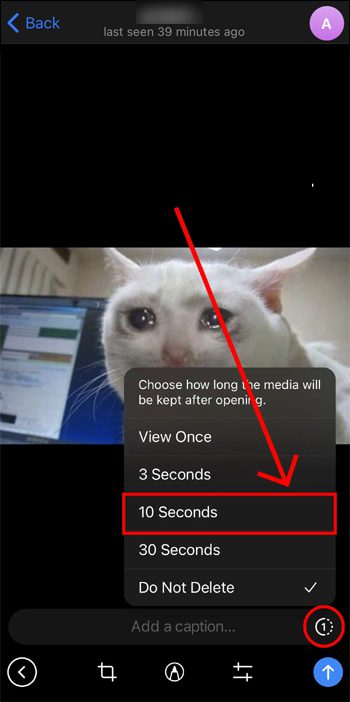
Tip: If you have set the timer to “3 seconds”, the photo will self-disappear in 3 seconds once it’s opened by the recipient.
Wrap Up
I hope by following the steps given in the article, you were able to send a disappearing photo on Telegram successfully.
If you have found this post helpful, then please share it as it can help others!
Please support us by subscribing to our YouTube Channel.
You May Also Like:
- Text Messages Disappeared On Android Phone? Here’s What To Do!
- How To Recover WhatsApp Messages Deleted By Sender On Android
- [WhatsApp Tips] Create and Share Poll In Seconds
- How To Create a WhatsApp Channel

Max Field is a founder of Recover Android Data. He is an Android lover and loves to write tips, tricks, fixes for errors, data recovery solutions and more related to Android. Provide Gaming Tips, Tricks, Game Error/Issues Solutions (PC/Xbox/PlayStation/Mobile). He is now also interested in solving LinkedIn Puzzles. He has 12+ years of experience in this field.