


Learn Top 4 Solutions To Retrieve Lost Or Deleted Files Like Photos, Videos, Audios, Contacts, Call Logs, Text SMS, WhatsApp Chats And More From Mi Phone!
Overview: If you have accidentally deleted important files from your Mi phone and want to recover those deleted files to your phone then don’t worry. You can easily get back deleted data no matter how you lose them or you have created backup or not. In this article you will find different solutions on how to recover deleted files from Mi phone. So, simply read the article and follow the recovery steps carefully.
- Solution 1: Retrieve Deleted Files From Mi Phone Using Mi Cloud Storage
- Solution 2: Recover Deleted/Lost Mi Files From Xiaomi Backup App
- Solution 3: How To Recover Deleted Photos/Videos/Documents From Mi Phone Via Google Drive Backup
- Solution 4: Recover Deleted Files From Mi Phone Without Backup Using Mi Phone Data Recovery Software
- Bonus Tip: Backup File From Mi Phone To Deal Data Loss Scenario
 Expert Tip: One of the best way to retrieve deleted files from Mi phone is to use world’s famous Android Data Recovery software which is a suitable Mi Files Recovery tool.
With the help of Mi Phone Data Recovery software, one can:
- Effectively recover deleted/lost/missing files like photos, videos, audios, contacts, call logs, call/voice recordings, text messages, WhatsApp conversations and many more.
- Easily retrieve files that have been deleted from your Mi phone due to mistakenly deletion, water damaged, factory reset, virus attacks, screen broken, system crashed, black/white screen, etc.
- Preview the recoverable data within the preview screen of the software.
- Available for both Windows and Mac computers.
- 100% read-only program. Safe, secure and easy to use.
Free Download Trial Version/Buy Now Mi Phone Data Recovery Software
 |
 |
How Files Get Deleted From Mi Phone?
There could be various reasons that can lead to the deletion of files from your Mi mobile phone. Below, we have mentioned some of the common reasons behind it.
Accidental Deletion: While deleting unwanted files from your device you tapped on the wrong file that you don’t want to delete.
Factory Reset: When your phone starts hanging, freezing then on that moment you factory reset your device to fix these problems and in this way all your data get deleted from your device.
Corruption/Malfunction To System Files: Malfunction or corruption to system files can corrupt the files saved in your device and SD memory card and delete your smartphone’s data.
Water Damaged: When you are using your phone in water areas and accidentally it dropped on water and get damaged and delete all your saved files from the device.
Other Reasons: Some of the other reasons are ROM flashing, black/white screen of death, forgotten screen passcode, rooting, screen broken/damaged, etc.
So, there were some common reasons which may cause the deletion of data from your Mi device.
Now, let us move to the solutions to recover deleted files from MI mobile.
Also Read: Tips To Increase Battery Life of Xiaomi Phones – Improve Battery Backup In MIUI
Solution 1: Retrieve Deleted Files From Mi Phone Using Mi Cloud Storage
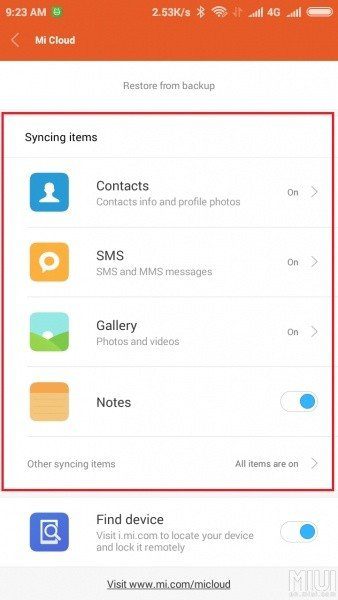
Mi provides Mi Cloud Storage where Mi users can back up their data from the Mi mobile phones. So, if you have used this backup feature to back up your Mi phone data then you can easily restore the deleted files from your Mi Cloud Storage to your device.
Here, follow the steps to restore deleted files from Mi Cloud Storage.
Step 1: On your device login to your Mi Account by visiting account.xiaomi.com and then tap on the Products tab. Here, you need to choose Mi Cloud.
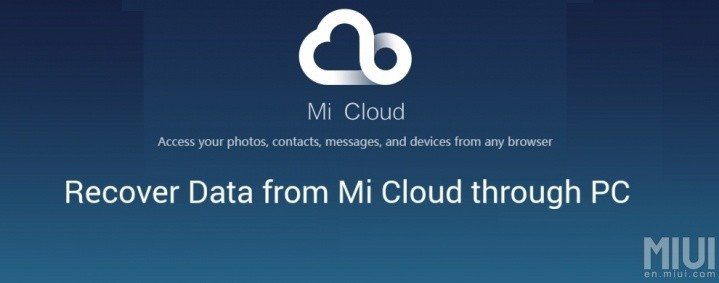
Step 2: Now, you will be asked to log in with your Mi Account.
Step 3: Then you will find all the files on the screen.
Step 4: Select the files that you need to restore and click on them and download.
Also Read: How To Backup Xiaomi Mi and Redmi Phone Data And Restore Them Back
Solution 2: Recover Deleted/Lost Mi Files From Xiaomi Backup App
If you have used Xiaomi Backup App to back up your files from your Mi smartphone before the deletion takes place then you can easily get back those data from it.
Below, follow the steps to restore the deleted files from Mi phone using Xiaomi Backup App.
Step 1: On your Xiaomi smartphone open Xiaomi Backup App.
Step 2: After that, a list of recoverable files will be displayed on the screen.
Step 3: From that list choose the files that you want to restore and tap on “Restore” button.

That’s It! When the process gets over all the selected files will be back on your phone.
Solution 3: How To Recover Deleted Photos/Videos/Documents From Mi Phone Via Google Drive Backup
Google Drive provides 15GB of free storage space to store valuable photos, videos and documents. So, if you have uploaded the files from your Redmi phones to Google Drive then it will take a few seconds to restore the deleted files from Google Drive backup.
Step 1: Open Google Drive app or you can visit Google Drive webpage on any browser.
Step 2: After that login to your Google account using the same ID and password.
Step 3: Now, you can see all the backed up files. You can also find the file by typing the file name in the search box.
Step 4: Select the file that you wish to restore and download the files from there.

Also Read: Fix “Install_Failed_User_Restricted” Error Android Studio Using Redmi Devices
Solution 4: Recover Deleted Files From Mi Phone Without Backup Using Mi Phone Data Recovery Software
If you don’t have a backup or if you are unable to recover the deleted data from your Mi phone from the above-mentioned solutions, then in this case you are suggested to try third-party Mi Phone Data Recovery software to get back deleted or lost files from Mi phone without backup.
|
|
This Android Data Recovery program helps you to retrieve different types of data from your device such as photos, contacts, calls, text messages, call/voice recordings, notes, WhatsApp chat history, calendar, documents and more file types.
The best part about this Xiaomi Data Recovery tool is that it recovers deleted files from both device’s internal storage and external SD card.
Supported Xiaomi Mi Phones – Xiaomi Mi 11, Xiaomi Mi 10T Lite 5G, Xiaomi Mi 10T Pro 5G, Xiaomi Mi 10T 5G, Xiaomi Mi 10 Ultra, Xiaomi Mi Note 10 Lite, Mi 10 Lite Zoom Edition, Xiaomi Mi 10 Lite, Xiaomi Mi 10 Pro, Xiaomi Mi 10, Xiaomi Mi CC9 Pro Premium Edition, Xiaomi Mi Note 10 Pro, Xiaomi Mi Note 10, Xiaomi Mi CC9 Pro, Xiaomi Mi Mix Alpha, Xiaomi Mi 9 Pro 5G, Xiaomi Mi 9 Lite, Xiaomi Mi 9T Pro, Xiaomi Mi CC9 Meitu Custom Edition, Xiaomi Mi CC9e, Xiaomi Mi CC9, Xiaomi Mi A3, Mi 9T, Mi Mix 3 5G, Xiaomi Mi 9 SE, Xiaomi Mi 9 Transparent Edition, Xiaomi Mi 9, Xiaomi Mi Play, Mi Mix 3, Xiaomi Mi 8 Screen Fingerprint Edition, Xiaomi Mi 8 Youth Edition, Mi Max 3, Mi A2 Lite, Xiaomi Mi A2, Mi 8 SE, Mi 8 Explorer Edition, Mi 8, Xiaomi Mi 6X, Xiaomi Mi MIX 2S, Xiaomi Mi Note 3, Xiaomi Mi MIX 2 Special Edition, Xiaomi Mi MIX 2, Mi A1, Xiaomi Mi 5X, Xiaomi Mi Max 2, Xiaomi Mi 6 Plus, Xiaomi Mi 6, Xiaomi Mi 5c, Xiaomi Mi MIX, Xiaomi Mi Note 2, Xiaomi Mi 5s Plus, Xiaomi Mi 5s, Xiaomi Mi Max Prime, Xiaomi Mi Max, Xiaomi Mi 5, Xiaomi Mi 4S, Xiaomi Mi 4c, Xiaomi Mi 4i, Xiaomi Mi Note Natural Bamboo Edition, Xiaomi Mi Note Pro, Xiaomi Mi Note, Xiaomi Mi 4, Xiaomi Mi 3, Xiaomi MI2A, Xiaomi MI2S, Xiaomi MI-1s, Xiaomi MI-2, Xiaomi Mi 9X, Xiaomi Mi 8 Lite, Mi Note 5 and other Xiaomi Mi Phones available in the market.
Note: Don’t use your Mi smartphone and don’t add any new files on it as it will overwrite the existing data which will lose the chance of successful recovery of files from Mi phone.
Here follow the – Steps To Recover Deleted Files From Mi Phone Without Backup Via Mi Data Recovery Software
Also Read: How To Recover Deleted Data From Redmi 8/8A/8T/Note 8 (Pro)
Bonus Tip: Backup File From Mi Phone To Deal Data Loss Scenario
You should always back up your precious files from your Mi phone to a safe place as data can be deleted anytime.
You can back up your Mi phone files to Mi Cloud storage, Google Drive, Xiaomi Backup App, etc.
There is also another backup app whose name is Mi File Backup & Restore software. You can use this tool to backup different types of file as well as you selectively backup the file and selectively restore them when they get deleted from your device.
Here is the – Steps To Backup Files From Mi Phone using Mi Data Backup & Restore Software.
Wrap Up
So, these were 4 different solutions that you can use to recover deleted files from Mi phone. If you have a backup of deleted files then follow the restore solutions and if you don’t have a backup then directly you should try Mi Data Recovery software.
Please support us by subscribing to our YouTube Channel.

Max Field is a founder of Recover Android Data. He is an Android lover and loves to write tips, tricks, fixes for errors, data recovery solutions and more related to Android. Provide Gaming Tips, Tricks, Game Error/Issues Solutions (PC/Xbox/PlayStation/Mobile). He is now also interested in solving LinkedIn Puzzles. He has 12+ years of experience in this field.