

Are you getting “error 10099” in Pokemon TCG Live?
If “Yes”, then you are not alone.
There are many players out there encountering this error.
The full error goes like this:
“There was an issue loading Pokemon TCG Live. Please try again.
ERROR: 10099”
Pokémon TCG Live is free to play card game, a digital version of the Trading Card Game (TCG) that is available for Android, iPhone, Windows, Mac and other mobile devices.
Unfortunately, a lot of players are bogged by “Connection Error 10099” whenever they try to log in to the Pokemon TCG Live game.
In this article, you will learn how to fix Pokemon TCG Live Error 10099.
How To Fix Pokemon TCG Live Error 10099
To fix error 10099 in Pokemon TCG live, you can follow these solutions:
- Restart Your Device
- Set Your Timezone on PC/Phone to UTC-6
- Check Your Internet Connection
- Check Server Status of Pokemon TCG Live
- Clear Cache and Data of Pokemon TCG Live
- Update Pokemon TCG Live
- Uninstall/Reinstall Pokemon TCG Live
- Contact Pokemon TCG Live Support
Fix 1. Restart Your Device
Whether you are playing Pokémon TCG Live on Android phone, iPhone, Windows or Mac computer, restart your device and then check.
Restarting the device gives a fresh start which can fix several issues.
Fix 2: Set Your Timezone on PC/Phone to UTC-6
This has been able to fix the Pokemon TCG Live error 10099.
Set your Timezone on PC/Phone to UTC-6 and you can login. It looks like it is a timezone problem.
Also, once you enter the game, head back to Timezone settings set it back to yours and still you can enter the game without any issue.
Fix 3. Check Your Internet Connection
Make sure your internet connection is working properly and is stable.
If you are using Wi-Fi then switch to mobile or vice versa.
Do an online speed test. If you find your internet is slow or poor, then turn off and turn on your router/modem. If required contact your internet service provider.
You can also enable/disable Airplane mode. Or try to connect to another internet connection.
Also Read: Fortnite Guide For Beginners: 12 Tips for Your First Match
Fix 4. Check Server Status of Pokemon TCG Live
You can check the server issue on the IsItDown RightNow or UpdownRadar.
You can also check for any announcement related to server outages or maintenance on the official Pokemon TCG Live Twitter/X handle.
If you find that its server is down, then you have to wait until the issue is solved by the Pokemon TCG Live.
Fix 5. Clear Cache and Data of Pokemon TCG Live
Sometimes, accumulated cache files and data create the issue. Hence, you must clear cache and data of the app itself.
On Android: Go to Settings > Apps > Manage Apps > Pokémon TCG Live > Storage & cache. Tap Clear cache and Clear data.
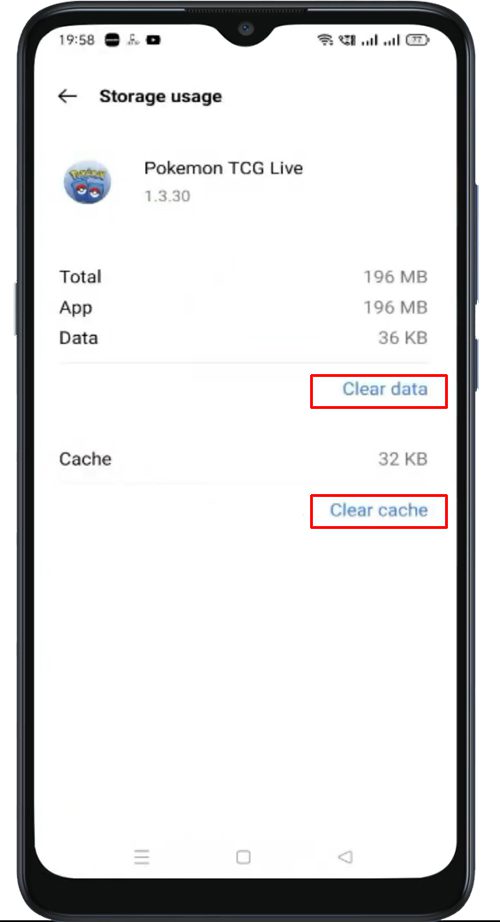
On iPhone: Go to Settings > General > iPhone Storage > Pokémon TCG Live > Offload App and confirm.
Also Read: Minecraft Pocket Edition (PE) Lagging On Mobile: Fix It Now!
Fix 6. Update Pokemon TCG Live
By keeping your app updated, it brings new features, improves performance and fixes bugs.
If your Pokemon TCG Live is outdated, then update it.
- Android users open Google Play Store.
- iPhone users open App Store.
- Search Pokemon TCG Live.
- Tap “Update” if any update is available.
Fix 7: Uninstall/Reinstall Pokemon TCG Live
If your Pokemon TCG Live connection error 10099 is not yet resolved then uninstall/delete the app and re-install it.
- Tap and hold Pokemon TCG live app icon, until some options appear. Tap “Uninstall/Delete” option.
- Now, head back to Play Store (for Android) or App Store (for iPhone).
- Search for Pokemon TCG live.
- Tap Install.
- Launch the game and try to log in again.
Also Read: [Problem Fixed] Among Us Crashing On Android
Fix 8. Contact Pokemon TCG Live Support
If you have tried all of the above-mentioned fixes and you are still getting error 10099, then it is suggested that you should contact Pokemon TCG Live Support.
- Go to https://support.pokemon.com/hc/en-us.
- Click on Pokemon Trading Card Game Live.
- Scroll down and click on “Contact Us”.
- Enter your email ID associated with Pokémon TCG Live.
- Enter your name and enter your Pokémon Trainer Club Screen Name.
- Select the device on which you are facing the issue.
- Select “Technical issue” under What can we help you with?
- Enter the Subject and describe your issue in the Description box.
- Click on Submit to send your message.
- Wait for a response from Pokémon TCG Live Support.
Wrap Up
So, these are the solutions to resolve Error 10099 in Pokemon TCG Live. And I hope any one of the fixes has definitely helped you in solving the problem.
If you have found this article helpful, then please share it as it can help other players!
Please support us by subscribing to our YouTube Channel.
You May Also Like:
- 4 Ways To Fix Party Play Not Showing in Pokemon Go
- Solutions To Fix Pokemon Go GPS Signal Not Found On Android
- How To Fix Monster Hunter Now Not Working
- Solved The Error “Sorry, You Have Been Blocked” on Discord

Max Field is a founder of Recover Android Data. He is an Android lover and loves to write tips, tricks, fixes for errors, data recovery solutions and more related to Android. Provide Gaming Tips, Tricks, Game Error/Issues Solutions (PC/Xbox/PlayStation/Mobile). He is now also interested in solving LinkedIn Puzzles. He has 12+ years of experience in this field.