
For The King 2 is a recently launched game after the month of expectation and excitement of players.
The game support online multiplayer along with the co-op on the same PC, as multiplayers modes are essential features of such games.
In the multiplayer mode, four players can join the game to play collaboratively.
Unfortunately, many players are encountering problems with Multiplayer not working in For The King 2.
In this article, you will learn how to fix For The King 2 Multiplayer not working (can’t play co-op with friends or stuck in the loading screen).
Also Read: How To Fix Fortnite Server Offline Error
How to Fix For The King 2 Multiplayer Not Working
To fix For The King 2 Multiplayer not working issues, you have to follow these fixes:
- Change your region.
- Verify integrity of game files.
- Delete all files in For The King II folder.
- Create a public lobby without password.
Fix #1: Change Your Region
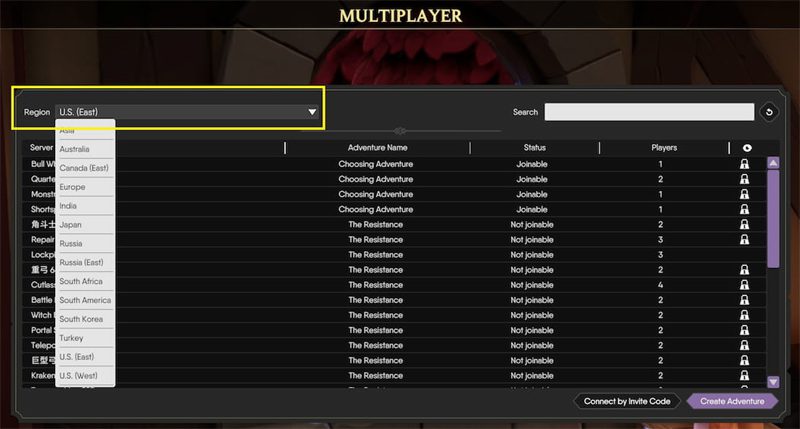
The region is set to null by default.
Here, you can select a region from the Menu in the top left corner. For example, you can select Turkey, Russia and you will see that the problem is solved
It enables the multiplayer games and everyone can join the Multiplayer.
Also Read: How To Fix Discord Mobile Stream Zoomed In
Fix #2: Verify Integrity of Game Files
- Open Steam.
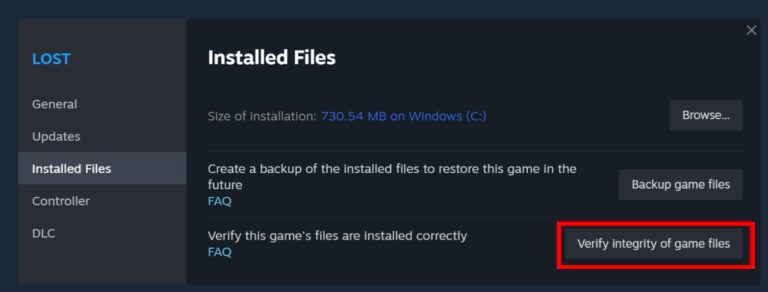
- Go to “Library” and right-click on “For The King 2” and select “Properties” from the drop-down menu.
- Select the “Installed Files” tab and click on “Verify Integrity of game files”.
Fix #3: Delete all Files in For The King II Folder
Deleting all files from the For The King II folder has also fixed the issue for several users.
Go to “AppData\LocalLow\IronOak Games\For The King II” and delete all files.
Also Read: How To Fix Athena Crash Reporter In Fortnite
Fix #4: Create a Public Lobby Without Password
Creating the public lobby has also solved the issue of Multiplayer not working issue for many players.
Simply, create a public lobby without a password.
Note: If you are still facing issues with multiplayer, then you have to wait for a hotfix and update the game.
Wrap Up
I hope that following the solutions mentioned in the post has helped you to fix For The King 2 Multiplayer not working issue.
If you have found this article helpful, then please share it as it can help other players!
Please support us by subscribing to our YouTube Channel.
You May Also Like:
- Fix Fortnite “Out of video memory trying to allocate a rendering resource”
- How To Fix Pokemon TCG Live Error 10099
- How To Fix Monster Hunter Now Not Working
- 4 Ways To Fix Party Play Not Showing in Pokemon Go

Max Field is a founder of Recover Android Data. He is an Android lover and loves to write tips, tricks, fixes for errors, data recovery solutions and more related to Android. Provide Gaming Tips, Tricks, Game Error/Issues Solutions (PC/Xbox/PlayStation/Mobile). He is now also interested in solving LinkedIn Puzzles. He has 12+ years of experience in this field.