

A new era of survival horror arrives with Resident Evil Requiem, the latest and most immersive entry yet in the iconic Resident Evil series.
Experience terrifying survival horror with FBI analyst Grace Ashcroft, and dive into pulse-pounding action with legendary agent Leon S. Kennedy. Both of their journeys and unique gameplay styles intertwine into a heart-stopping, emotional experience that will chill you to your core.
However, many players are not able to find the Mouse Sensitivity option so that they can change it.
In This Article, You Will Learn How to Change Mouse Sensitivity in Resident Evil Requiem or Where Is the Mouse Sensitivity Option in Resident Evil 9?
Steps To Change Mouse Sensitivity in Resident Evil Requiem
1. So, first of all launch the Resident Evil Requiem.
2. And when you are on Menu screen, click on Options.
3. At the top navigation bar click on Camera section.
4. Select the Grace’s Camera or Leon’s Camera.
5. Select if you want to change the sensitivity for First Person or Third Person.
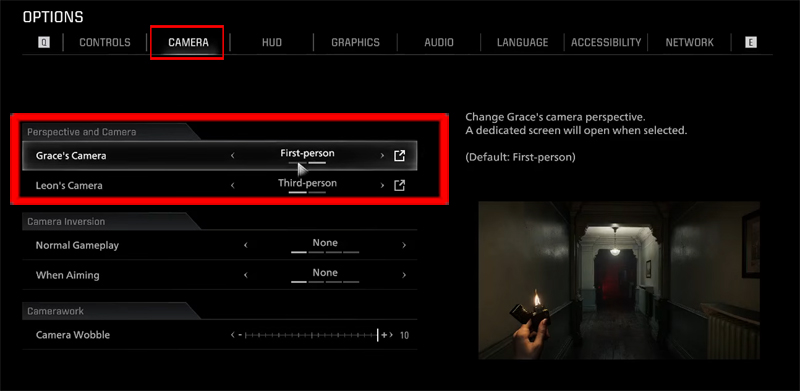
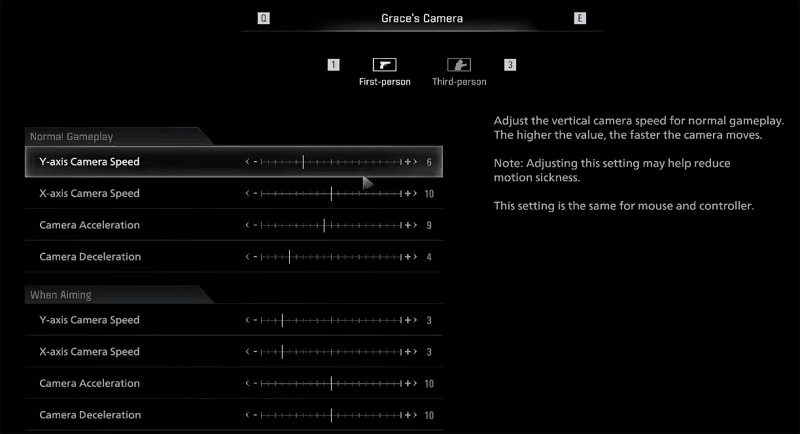
6. And then click on the arrow icon next to it and here you will find and can change the Mouse Sensitivity Options.
7. So, you can now adjust the sliders to adjust sensitivity.
If you have found this post helpful, then please share it as it can help other users!
Further Readings:
- Fix Sorry Something Went Wrong Error in Resident Evil Requiem
- Fix Resident Evil Requiem Crashing/Not Launching/Fatal Error/Not Loading/Black Screen On PC
- Fix Black Ops 7 Error Code (0xfffffffe) The Game Has Crashed on PC

Max Field is a founder of Recover Android Data. He is an Android lover and loves to write tips, tricks, fixes for errors, data recovery solutions and more related to Android. Provide Gaming Tips, Tricks, Game Error/Issues Solutions (PC/Xbox/PlayStation/Mobile). He has 11+ years of experience in this field.